
If you are looking at Guru IPTV, you are probably comparing a few providers that all promise thousands of channels, 4K quality and “no buffering”. Marketing pages look almost identical — so the decision has to come from things you can check yourself. Here are the six that matter, and how to test each one in a single evening.
Fair warning: we have not independently tested Guru IPTV, so we will not tell you whether it is good or bad. What we can give you is the method — it works for Guru IPTV, for us, and for any other service.
In this guide
The 6 checks to run on Guru IPTV or any provider
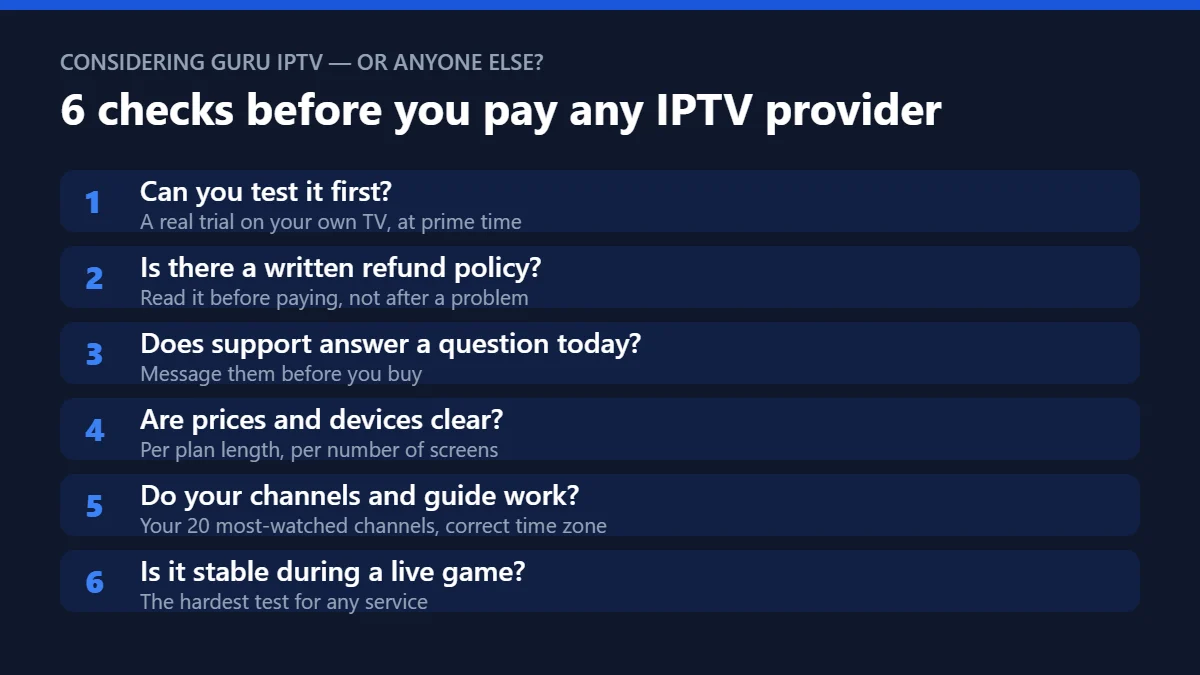
1. Can you test it first?
A real trial on your own TV and internet beats any review. Run it in the evening, when networks are busiest.
2. Is there a written refund policy?
Find it, read it, and note the conditions. A provider without one leaves all the risk with you.
3. Does support answer before you buy?
Send a simple question — “Which app do you recommend for Firestick?” — and time the reply. Pre-sale support is the best preview of after-sale support.
4. Are prices and devices clear?
You should see the price for every plan length and every number of screens before checkout. Be careful with “lifetime” offers and prices that change between pages.
5. Do your channels and the TV guide work?
List the 20 channels your household watches most and tick each one off during the test. Check that the guide shows the right US time zone.
6. Is it stable during a live game?
Sports are the hardest content to stream. Watch 30 minutes of a live match: no freezes is the goal. Our 20-minute speed test gives you a full scorecard.
Paying safely for Guru IPTV or any IPTV service
Whichever provider you choose, protect your money the same way. Pay with a method you can dispute, keep the confirmation email, and never send payment through an unusual channel because a seller asks you to. The Federal Trade Commission explains how to spot online payment scams in plain English. If a deal for Guru IPTV, for us or for anyone else looks too good to be true, it usually is.
Switching providers without losing a day of TV
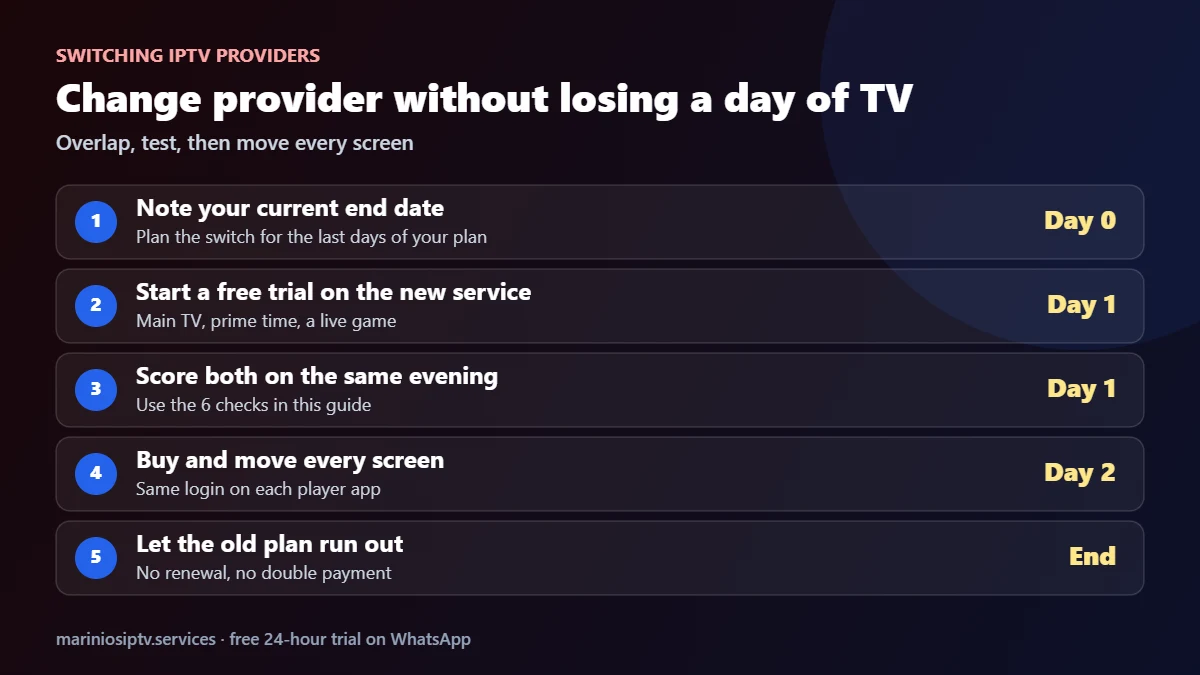
If you already pay for Guru IPTV or another service and want to compare, overlap rather than cancel first. Start a free trial on the new service a few days before your current plan ends, score both on the same evening with the six checks, then move each screen. Most player apps let you add a second playlist, so you can switch between the two with a click during the test. Our IPTV player guide shows how.
How Marinios IPTV answers the same 6 checks
| Check | Marinios IPTV |
|---|---|
| Test first | free 24-hour trial |
| Refund policy | Written refund policy |
| Support | 24/7 |
| Clear prices | From $15 for 1 month to $60 for 12 months on 1 device; 2–4 device plans listed on the plans page |
| Channels & guide | 55,000 live channels in HD and 4K, EPG and catch-up |
| On demand | 250,000 movies and series |
Run the same six checks on every provider on your shortlist, including us, and pick the one that scores best on your screen.
Quick questions
Is Guru IPTV good?
We have not tested Guru IPTV ourselves, so we cannot say. Run the six checks above during a trial and you will know within one evening whether it suits your TV and internet.
What should I compare Guru IPTV with?
Any two or three providers that offer a test. Use the same score sheet for all of them; our best IPTV services guide has a 100-point version.
Is a review site enough to decide?
Use reviews to build a shortlist, then decide with your own test. Your internet and devices are what matter.
Which app should I use?
Most providers work with popular players such as IPTV Smarters; ask support which one they recommend for your device.
Fire TV and Firestick are trademarks of Amazon.com, Inc. or its affiliates. IPTV Smarters is a trademark of its respective owner. Marinios IPTV is not affiliated with or endorsed by them.