
Your IPTV subscription gives you the channels. The player is the app that shows them on your screen, and it decides how your evenings feel: how fast channels switch, how clear the TV guide looks, and how much setup you face on day one. When people ask what the best IPTV player is in 2026, two names come up first: IPTV Smarters Pro and IBO Player Pro. Both are in the official app stores, and both give you 7 days free to test them before paying anything. This guide compares them so you can pick the best IPTV player for your own device, and shows what to test before you pay for an activation.
View Plans & Prices – From $15
Key takeaways
- Choose IPTV Smarters Pro to log in with a username and password in two minutes, especially on a Firestick or a phone.
- Choose IBO Player Pro to add your playlist once from a website, with a simple TV-style screen on smart TVs and Android boxes.
- Both offer a 7-day free trial, then a one-time activation that is paid separately from your IPTV subscription.
- A player never includes channels. Start the app trial and your IPTV trial on the same day.
In this guide
- What an IPTV player does, and what it does not
- The best IPTV player apps side by side
- How to install either player from Google Play
- Setting up IPTV Smarters Pro (2 minutes)
- Setting up IBO Player Pro (5 minutes)
- M3U link or Player API: which one do you need?
- Best IPTV player by device
- 6 things to test during the free week
- Other players worth knowing
- Common mistakes when choosing a player
- Quick questions
What an IPTV player does, and what it does not
Think of the player as a remote control for content you already pay for. Even the best IPTV player cannot add a single channel. It reads the details your provider sends you, loads the channel list, shows the TV guide and plays the streams. It does not come with channels, and it is not responsible for the stream quality: if a channel freezes in every app, the cause is the service or your connection, not the player.
That is why the right question is not “which player has the most channels” but “which player feels fastest and clearest on my device”. Answer that, and you have found your best IPTV player. There is no universal winner, only the best IPTV player for your screen.
The best IPTV player apps side by side
| IPTV Smarters Pro | IBO Player Pro | |
|---|---|---|
| How you log in | Username, password and server URL, typed in the app (Player API / Xtream) | Playlist link added on the IBO website, using the app’s Device ID and Device Key |
| Free trial | 7 days | 7 days |
| After the trial | One-time activation | One-time activation for that device |
| Where to get it | Google Play, App Store; Firestick via Downloader | Google Play, App Store and some smart TV app stores |
| Best for | Quick setup, several logins, phones and Firestick | Smart TVs and Android TV boxes, families who want a simple screen |
The activation price is shown inside each app before you pay and can differ between stores and countries, so check it there rather than trusting a number on a forum.
Two separate payments, two ways to activate
Keep in mind that the player activation and your IPTV subscription are two different purchases. The subscription gives you the channels; the activation unlocks the app after its free week.
When the free week ends, the app shows an activation screen with your Device ID and Device Key. On IBPlayer Pro, for example, the activation costs €9.99, paid once on the player’s website (price at the time of writing). You can activate it in one of two ways:
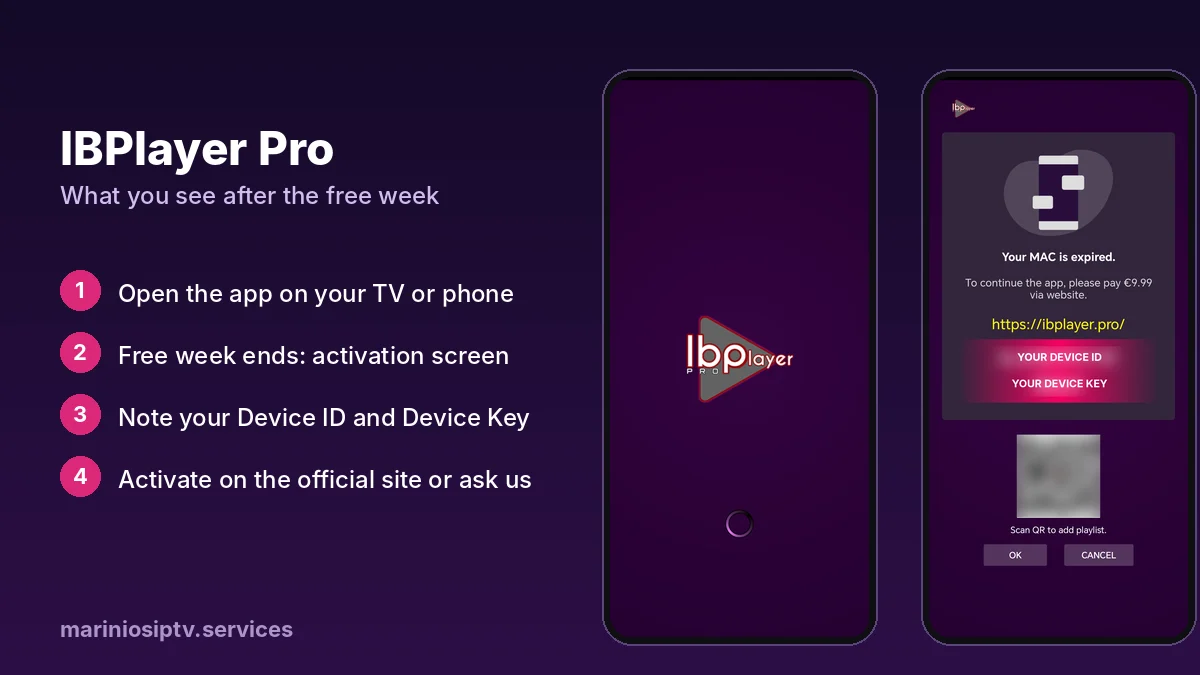
- Yourself, inside the app or on the player’s official website.
- Through Marinios IPTV: message us on WhatsApp and we activate it for you, so everything is handled in one conversation.
Subscription + player activation, in one WhatsApp chat
Send us a photo of your activation screen. We activate the player on your device and set up your Marinios IPTV subscription in the same conversation: 55,000 live channels, 250,000 movies and series, up to 4K.
How to install either player from Google Play
This works on Android phones, Android TV boxes, Google TV and most TVs that run Google TV.
- Open the Google Play Store on the device.
- Search for IPTV Smarters Pro or IBO Player Pro.
- Check the developer name and the reviews before you tap Install. Several copycat apps use almost the same name and logo.
- Tap Install, then Open. The free trial usually starts the first time you open the app.
On a Firestick, the steps are different because it uses the Amazon Appstore. See our Firestick install guide.
Setting up IPTV Smarters Pro (2 minutes)
The first screen asks how you want to log in. Pick the option that matches what your provider sent you:
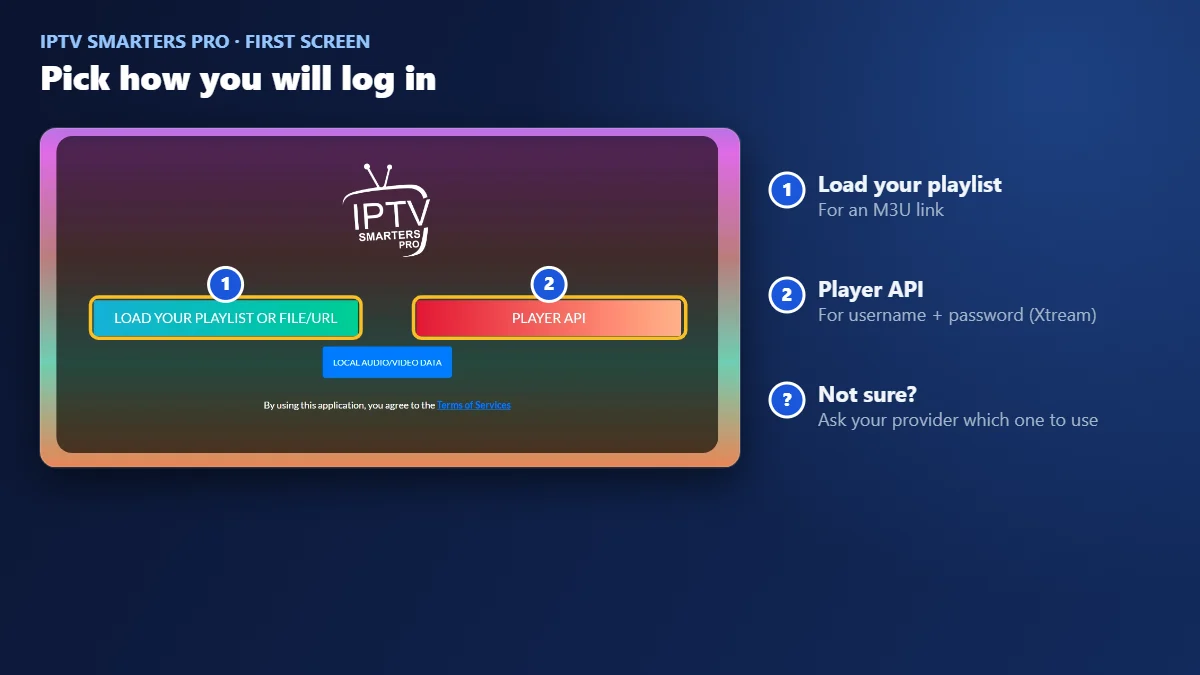
- Choose Player API (or Login with Xtream Codes API in older versions).
- Enter any name, then your username, password and server URL exactly as your provider sent them. The URL needs
http://and the port number, with no slash at the end. - Press Add User and wait for channels, movies and series to load.
If you get an error, our authorization fix guide covers every common cause.
Setting up IBO Player Pro (5 minutes)
IBO works differently: you never type your login on the TV, which is why many families call it the best IPTV player for a smart TV. You add it from a phone or computer instead, which is much easier than typing with a remote.
- Open the app on your TV. The first screen shows a Device ID (it looks like a MAC address) and a Device Key. Take a photo of it.
- On your phone or computer, go to the player’s official website and open the playlist page.
- Enter the Device ID and Device Key, then add your playlist link (M3U URL) from your provider. Add the TV guide link (EPG) too if you have one.
- Save, then restart the app on the TV. Your channels appear.
M3U link or Player API: which one do you need?
Providers send your details in one of two formats, sometimes both:
- Player API (Xtream): a username, a password and a server URL. Channels, movies, series and the TV guide load together. IPTV Smarters Pro is built around it.
- M3U playlist: one long link that contains your login. IBO Player Pro uses it, and Smarters accepts it too.
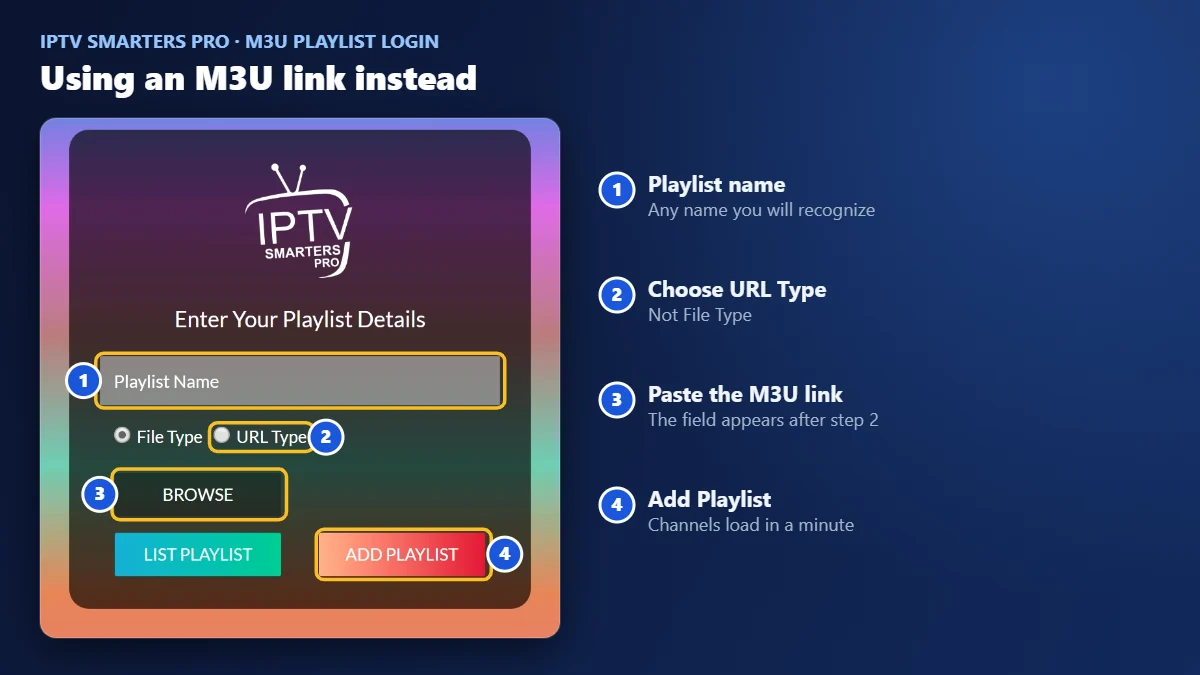
If you only have an M3U link and want to use Smarters, choose Load your playlist, pick URL Type, paste the link and tap Add Playlist. Treat that link like a password: anyone who has it can use your account.
Best IPTV player by device
| Device | Our pick | Why |
|---|---|---|
| Firestick (Fire OS) | IPTV Smarters Pro | Quick login with the remote; installed with Downloader |
| Android TV box, Google TV | Either | Both are on Google Play; try both during the free week |
| Smart TV with its own app store | IBO Player Pro | Login is added from your phone, no typing on the TV |
| Android phone or tablet | IPTV Smarters Pro | Fast setup, easy to switch between several logins |
| iPhone or iPad | Either | Both are in the App Store; check the developer name |
| Apple TV | An App Store player such as Chillio or GSE Smart IPTV | Apple TV cannot sideload; see our Apple TV guide |
| Roku | Few players; often a stick on HDMI | Roku’s store has little choice; see our Roku guide |
The best IPTV player for Firestick is usually IPTV Smarters Pro, because you log in once with the remote and the app stays light on older sticks. On a smart TV, IBO-style players win because you add your playlist from your phone.
6 things to test during the free week
Seven free days is plenty, as long as you use them. Most people install a player, scroll for five minutes and decide. Then the first busy Saturday shows them what they missed. When customers ask us which is the best IPTV player, we send them this short list and tell them to try both apps on the same TV, the same evening:
| Test | How to do it | What good looks like |
|---|---|---|
| Channel switching | Flip through ten live channels in a row | Each one starts in about 2 to 3 seconds |
| TV guide | Open the guide and scroll a few hours ahead | Right shows, right times, no long loading |
| Favorites | Add five channels you watch every day | A list you reach in one or two clicks |
| Movies and series | Open a film, skip forward, then resume later | It remembers where you stopped |
| Parental PIN | Lock one category, then try to open it | The app asks for the PIN every time |
| Remote comfort | Use only the TV remote for ten minutes | You never need your phone to get around |
Score each app out of six. It takes one evening, and it beats any “best IPTV player” ranking written by someone who has never seen your TV. The best IPTV player for your home is simply the one with the higher score on your own screen, not the one with the longest feature list.
Other players worth knowing
Smarters and IBO cover most homes, but two other names come up often when people ask us for the best IPTV player. Like every player, neither includes channels.
TiviMate
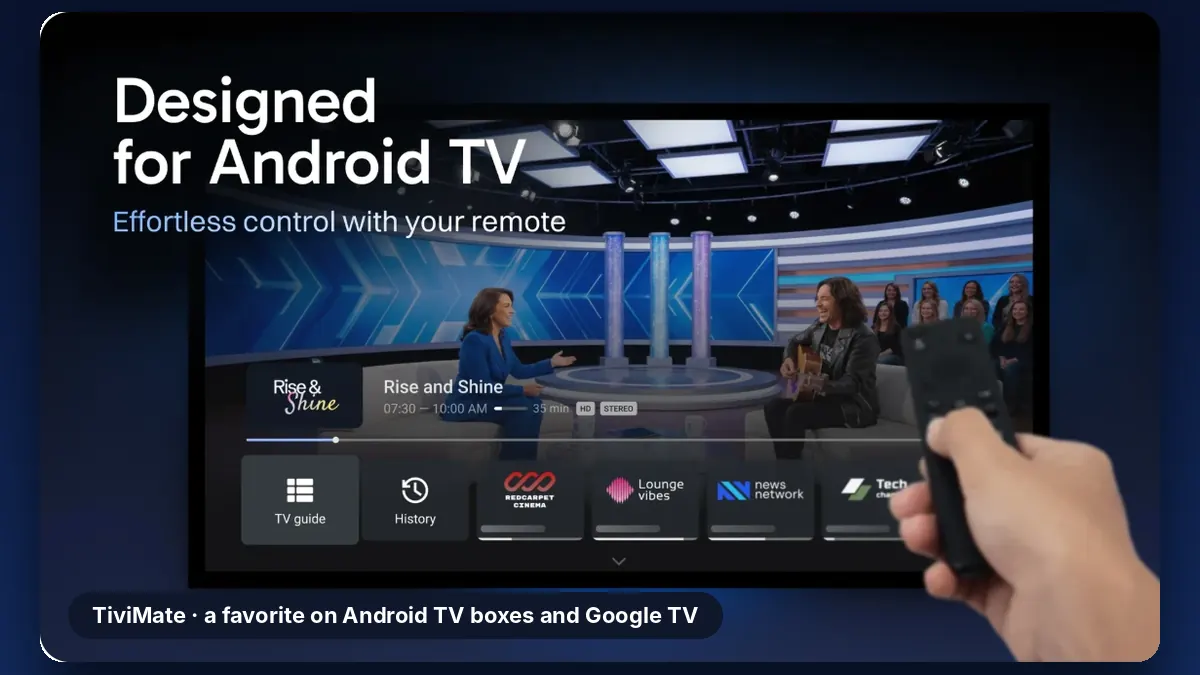
Built for Android TV boxes and Google TV, and designed to be used entirely with the remote. Its TV guide is one of the clearest you will find. It is not available on iPhone, and the full feature set requires a paid upgrade inside the app.
GSE Smart IPTV
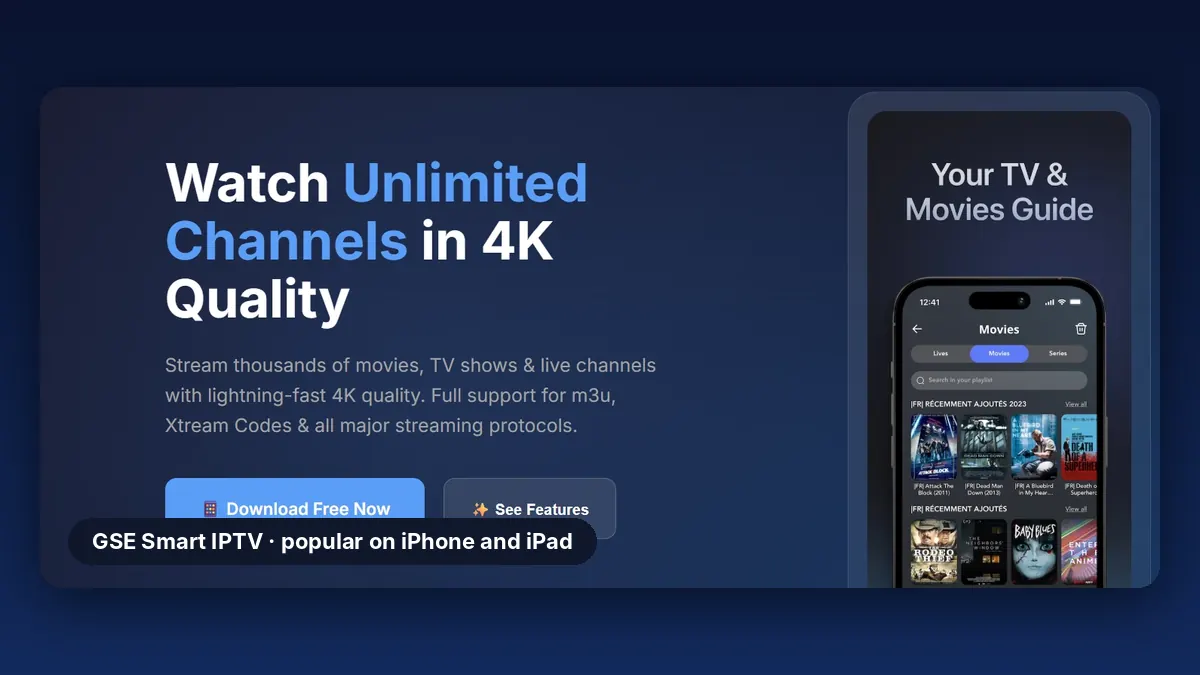
A long-standing choice on iPhone and iPad. It accepts both M3U playlists and Xtream logins, so the same details from your provider work here too.
Common mistakes when choosing a player
- Installing a copycat app. Same icon, slightly different name, different developer. Check before you install.
- Paying for the player before testing the service. Line up both trials first; pay only when both work well together.
- Blaming the player for buffering. If it freezes in every app, test your connection with our 20-minute speed test.
- Sharing your M3U link. It works like a password and can lock you out if too many devices use it.
Ready to watch? Pick a plan on our plans page, or start with a free 24-hour trial on WhatsApp. If your player’s free week has ended, we can activate it in the same chat.
Using an Amazon stick? Our best IPTV for Firestick guide compares these players on Fire TV and explains which sticks can install them. The app needs a subscription from one of the IPTV service providers; see our IPTV subscription guide for plans.
Watching on an Apple box? Our IPTV on Apple TV guide covers the App Store players, Chillio setup and the settings that make the picture smoother.
On a Roku? Player choice is limited there; our IPTV on Roku guide explains the alternatives.
Setting up on an LG? See our IPTV on LG Smart TV guide for the players that work with webOS.
Picked Smarters as your player? Our IPTV Smarters Pro subscription guide shows what the subscription should include.
Quick questions
Is there a free IPTV player?
Some players are free with limits, and most paid ones offer a free week. A free player can open an M3U link, but often without a good TV guide or catch-up. Test before you decide.
What is the best IPTV player for Apple TV or Roku?
On Apple TV, use an App Store player such as Chillio or GSE Smart IPTV. On Roku, choice is limited; a Firestick on HDMI is often the easiest fix.
What is the best IPTV player?
The best IPTV player is the one that feels fastest on your own device. On most Android devices, IPTV Smarters Pro and IBO Player Pro are the two safest choices. Their free week lets you compare them before paying.
Do these apps include free channels?
No. They are players only. Channels come from your IPTV subscription.
What happens after the 7 days?
The app asks for its one-time activation. You can buy it in the app or on the player’s official website, or ask us on WhatsApp to activate it for you. It is paid separately from your IPTV subscription. If you do not activate it, the app usually stops playing, but your subscription is not affected and works in any other player.
Will my provider’s details work in both apps?
Yes, in most cases. Smarters uses the Player API login (username, password, URL); IBO uses the M3U playlist link. Ask your provider for both. Marinios IPTV customers can get them on WhatsApp.
Can I use one player on several TVs?
Each device needs its own copy of the app, and the activation usually covers one device, so check the terms in the app before buying for several TVs. Your IPTV plan must also allow that many screens at the same time.
Watching on a laptop or desktop instead? Our IPTV Smarters Pro Windows guide compares the best IPTV player for Windows, from MyIPTV to Kodi.
Using a Google TV or Android TV box? Our IPTV on Android TV guide shows the best IPTV app for Android TV and the setup step by step.
Fire TV and Firestick are trademarks of Amazon.com, Inc. or its affiliates. Apple TV, iPhone and App Store are trademarks of Apple Inc. Android TV, Google TV and Google Play are trademarks of Google LLC. IPTV Smarters, IBO Player Pro, TiviMate and GSE Smart IPTV are trademarks of their respective owners. Marinios IPTV is not affiliated with or endorsed by them.