
IPTV channels come in huge numbers. A list of 55,000 live channels sounds impressive — until you open it on a TV remote. Most households end up watching 20 to 40 channels regularly. The trick is not having more channels; it is finding yours in seconds. This guide shows how IPTV channels are organized, how to set up your list in 10 minutes, and which categories a typical US household really uses.
In one sentence: hide the countries you do not need, keep one quality version of each channel, save favorites, and let the TV guide do the rest.
In this guide
- How many channels does IPTV have?
- How IPTV channels are organized
- Which IPTV channels does a US household really watch?
- Set up your IPTV channels in 10 minutes
- 3 habits that make IPTV channels easy to browse
- Live channels or VOD?
- Getting the most from the TV guide and catch-up
- A starter setup that works for most families
- Quick questions
How many channels does IPTV have?
It depends on the provider: small services offer a few thousand channels, large ones tens of thousands. Marinios IPTV includes 55,000 live channels plus 250,000 movies and series on demand. The bigger number is not the whole story, though. What matters is whether the channels you actually watch are there, in HD or 4K, with a working TV guide. The rest of this guide shows how to find them fast in a list that big.
How IPTV channels are organized
Channels are grouped into categories, usually by country first and then by type: news, sports, movies, kids, documentaries, music and event channels. Many channels appear several times with a tag such as HD, FHD or 4K — same content, different picture quality and bandwidth.
| You will see | What it means |
|---|---|
| Category (e.g. “USA | Sports”) | A folder of related channels |
| HD / FHD / 4K tag | The quality of that version of the channel |
| EPG | The TV guide: what is on now and next |
| Catch-up | Watch shows that already aired, on supported channels |
| VOD | Movies and series you start whenever you want |
Which IPTV channels does a US household really watch?
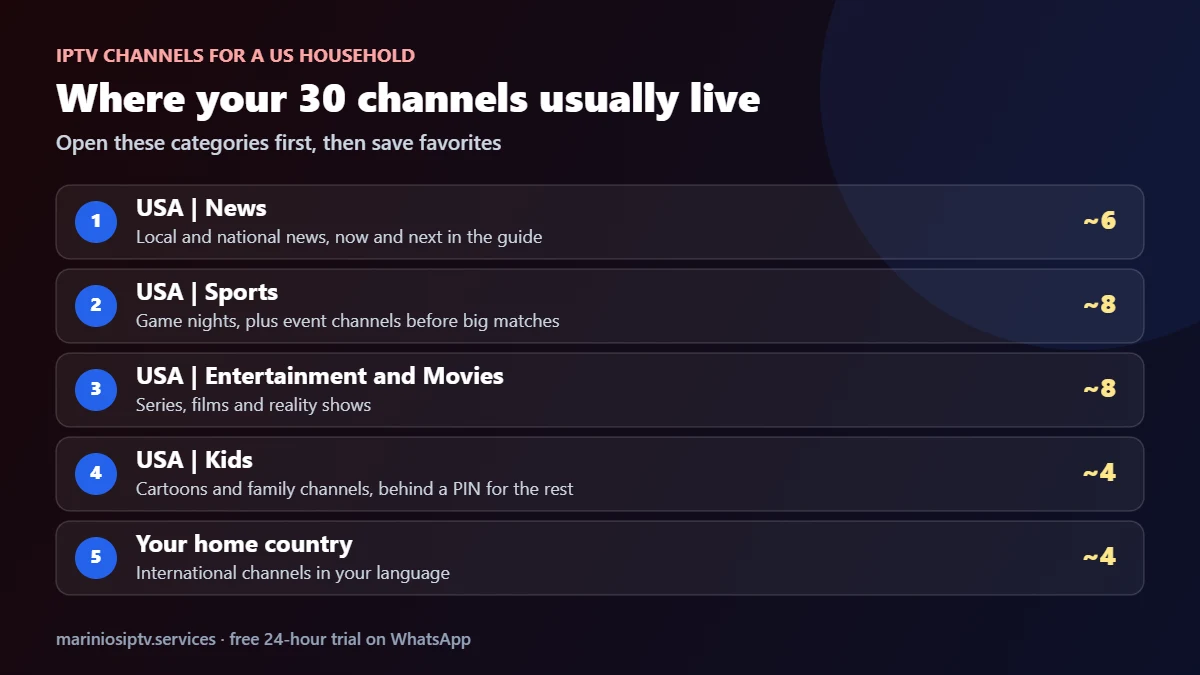
Studies of TV habits have shown the same thing for years: people watch a small share of the channels they pay for. Nielsen, the company that measures US TV audiences, reported in a well-known study that the average US home received about 189 channels but watched around 17 of them. IPTV channels are no different. For most American homes, the 30 IPTV channels that matter sit in five places:
- News: your local stations and one or two national news channels.
- Sports: the networks that carry your teams, plus event channels on game days.
- Entertainment and movies: the series and film channels you already know.
- Kids: a few cartoon and family channels.
- Your home country: if you grew up elsewhere, IPTV channels in your own language are often the main reason to subscribe.
During a free trial, write your own list of these IPTV channels and check each one plays and shows the right times in the guide.
Set up your IPTV channels in 10 minutes
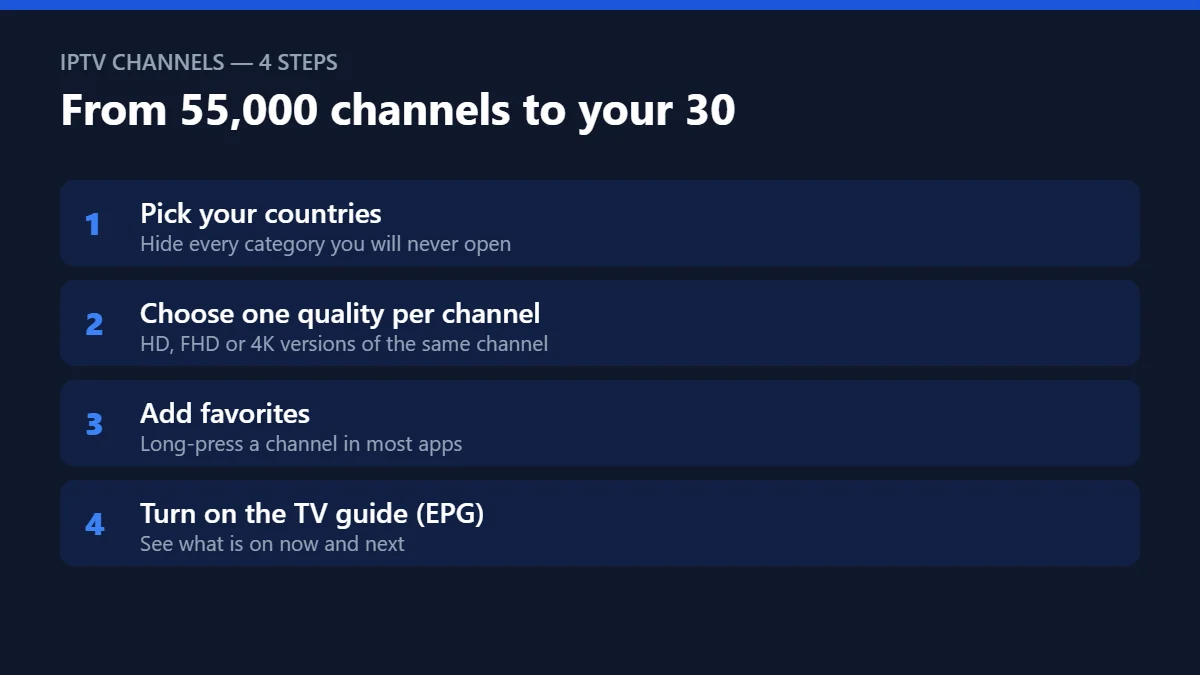
- Pick your countries. Most apps let you hide or reorder categories in their settings. Keep only the regions your household watches.
- Choose one quality per channel. On fast, wired internet, use FHD or 4K. On Wi-Fi far from the router, HD is often smoother.
- Add favorites. In most players you long-press a channel or press the menu button to add it. Your favorites list becomes your real “TV”.
- Turn on the EPG. The guide loads automatically in most apps; if it stays empty, refresh it from the settings once.
3 habits that make IPTV channels easy to browse
- Use search, not scrolling. Typing three letters is faster than scrolling through a category.
- Know your backup. If one version of a channel freezes, switch to its other quality version before changing anything else.
- Check the guide before a big match. Event channels often appear only shortly before the start.

Live channels or VOD?
Live channels are best for sports, news and anything happening now. For films and series, VOD is usually the better choice: you start, pause and resume when you want, and the picture is often more stable than a live broadcast. Marinios plans include both — 55,000 live channels and 250,000 movies and series — on every plan.
Getting the most from the TV guide and catch-up
The EPG turns a long list into a normal TV experience: you see what is on now, what starts next, and you can jump straight to a program. If the guide shows the wrong times, check that your device’s time zone is set correctly — the guide follows the device clock.


Catch-up works on supported channels and lets you start a show that has already aired. Look for a small replay or clock icon next to the channel name, then open the program in the guide. It is ideal for news bulletins, talk shows and matches played while you were at work.
A starter setup that works for most families
- Main TV: favorites for local news, two sports channels, a movie channel and a kids channel.
- Kids’ room: only kids and cartoon categories visible, adult categories locked with a PIN.
- Phone or tablet: news and sports favorites for watching on the go.
Quick questions
How many IPTV channels do I really need?
Most homes use 20 to 40. A big list is useful for variety, but check that your own IPTV channels are there and stable before you pay.
Do IPTV channels include a TV guide?
Yes, on most channels. If the guide is empty or the times are wrong, our EPG guide shows the fix.
Why is the same channel listed three times?
Each entry is a different quality. Pick the one that plays smoothly on your connection.
Can I hide adult channels?
Yes — most players let you lock categories with a PIN. See our parental-control checklist.
Nielsen is a trademark of The Nielsen Company. Marinios IPTV is not affiliated with or endorsed by them.