
You open your IPTV app, scroll to a channel, and instead of “Evening News, 8:00 to 9:00 PM” you see “No information”. What is missing is the EPG. This guide explains what EPG on IPTV is, where the guide data comes from, how to add it in the most popular players, and how to fix the problems people hit most when the IPTV EPG is not working: an empty guide, wrong times and a guide that stops updating.
Quick answer: EPG on IPTV is the electronic program guide: the TV schedule that shows what is on each channel now and next. Your provider sends it with your login, and your player app loads it. If it shows “No information”, refresh the guide, check your time zone or ask your provider for the EPG link.
Key takeaways
- EPG stands for Electronic Program Guide: the TV schedule your IPTV app shows for each channel.
- The guide is a separate file (usually XMLTV) that your provider publishes. Your app matches it to channels using an ID.
- With a Player API (Xtream) login, most apps load the EPG automatically. With an M3U link, you often have to add the EPG link yourself.
- An empty guide is usually a missing EPG link or an ID mismatch. Wrong times are almost always a time zone setting.
In this guide
- What is EPG on IPTV?
- What does EPG mean on a TV and on the remote?
- Where does the EPG data come from?
- EPG with Player API vs. EPG with an M3U link
- How to add the EPG in popular IPTV apps
- IPTV EPG not working? The common problems
- The best EPG for IPTV: what a good guide source looks like
- Does the EPG affect streaming quality?
- Want a service where the guide just works?
- Quick questions
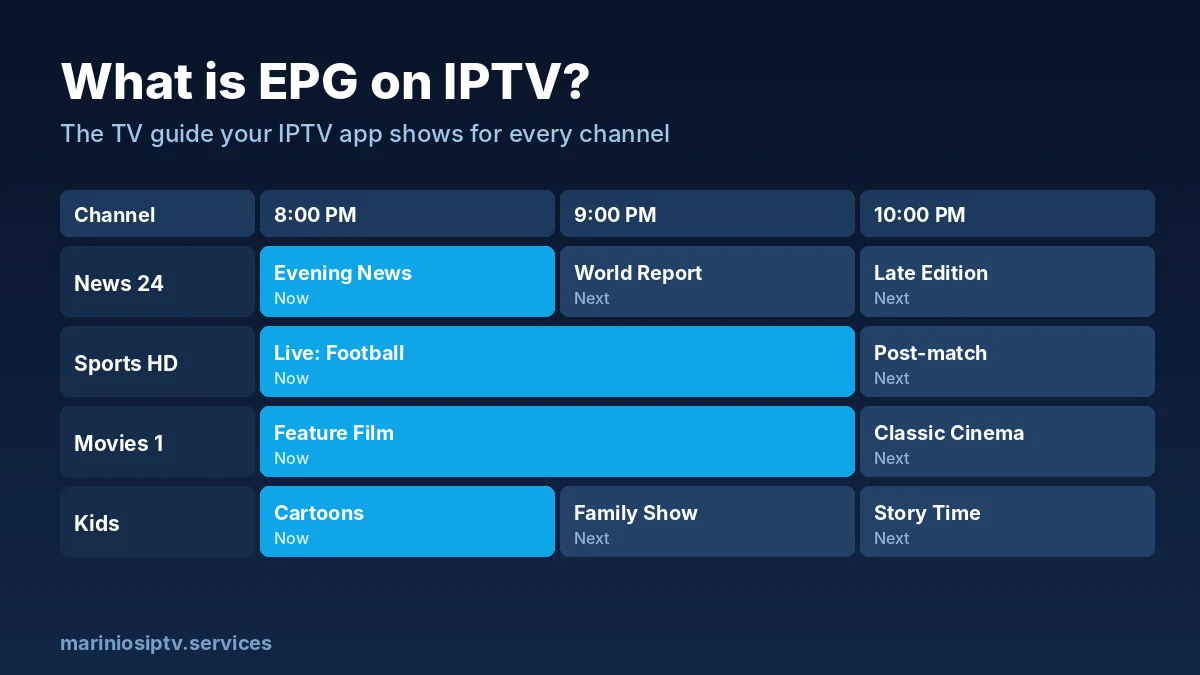
What is EPG on IPTV?
EPG on IPTV is the program guide that shows what is on each channel now and next, often for several days ahead. It is the IPTV version of the grid you know from cable or satellite TV: channel names down the side, time across the top, and show titles in between.
A good EPG does more than look nice. It lets you:
- see what is playing without switching channels,
- find a match or a show later in the week,
- set reminders or recordings in apps that support them,
- use catch-up (replay) on channels that offer it, because catch-up relies on the guide to know when each program started.
What does EPG mean on a TV and on the remote?
EPG stands for Electronic Program Guide: the on-screen TV schedule that shows what is on now and what comes next. On a cable box or a TV with an antenna, the EPG or Guide button on the remote opens that grid. The IPTV EPG is the same idea, with one difference that confuses a lot of people.
With IPTV, the guide lives inside the player app, not in the TV itself. So the EPG button on your TV remote usually opens the TV’s own antenna guide, or nothing at all. To see your IPTV EPG, open the player and choose its TV Guide, EPG or Live with EPG section instead.
What are EPG channels?
EPG channels are channels that have guide data attached, so the player can show their programs. Each one is matched to its schedule by a small ID in the playlist. When a channel has no match, you see “No information” in the guide, even though the channel itself plays fine. A good provider keeps those matches up to date, which is why IPTV EPG quality says a lot about a service, and why the best EPG for IPTV is the one your provider maintains for its own channel list.
| You press or see | What it means | Where to look with IPTV |
|---|---|---|
| EPG / Guide button on the TV remote | Opens the TV’s own program guide | Usually not your IPTV guide; open the player app |
| “Live with EPG” | Live channels shown with what is on now and next | A section in IPTV Smarters and similar players |
| “Update EPG” / “Refresh EPG” | Download fresh guide data now | Player settings or the live TV menu |
| “Show full EPG” / “TV Guide” | Open the full schedule grid | Inside the live TV section of the player |
Where does the EPG data come from?
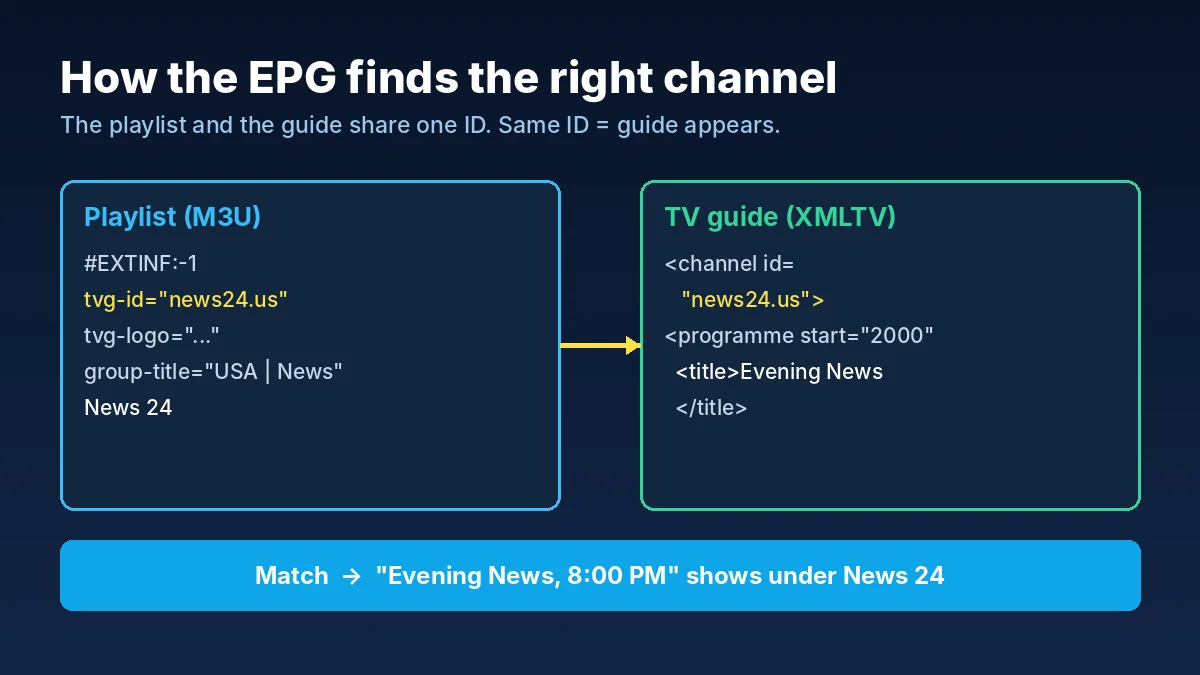
Your channel list and your TV guide are two different things. The playlist tells the app which channels exist and where to stream them. The EPG tells it what is on those channels and when.
Most providers publish the guide in a standard format called XMLTV. For an Xtream-style account, the EPG link usually looks like this:
http://server-address:8080/xmltv.php?username=YOURNAME&password=YOURPASS
Inside that file, every program is attached to a channel ID. Your playlist carries the same ID for each channel (in an M3U playlist it is the tvg-id field). When the two IDs match, the guide appears. When they do not, the channel shows “No information” even though the guide file is fine.
Want to see how the playlist side works? Our M3U playlist guide explains the tvg-id line by line.
EPG with Player API vs. EPG with an M3U link
| Player API (Xtream login) | M3U link | |
|---|---|---|
| EPG setup | Usually automatic | Often manual: you paste the EPG link |
| Channel matching | Done by the provider | Depends on the tvg-id in the playlist |
| Updates | Refreshed by the app | Refreshed on the schedule you set |
| Best for | Most people, especially on Firestick and phones | Apps that only accept playlists |
Our advice: if your app offers a Player API login, use it. The EPG comes with it, and you skip most of the problems below.
How to add the EPG in popular IPTV apps
IPTV Smarters Pro
With a Player API login, the guide loads with your channels. If it looks empty, open Live TV and use the option to refresh or reload the EPG, then wait a minute: a full guide can take time to download. Our Firestick install guide shows the login step by step.
What does “Live with EPG” mean in IPTV Smarters?
“Live with EPG” is the IPTV Smarters section that shows live channels together with their guide: what is playing now and what is next. If you only use “Live TV”, you get the channels without the schedule. Choose “Live with EPG” when you want the cable-style view.
What do “Update EPG” and “Show full EPG” mean?
“Update EPG” (or “Refresh EPG”) downloads the latest guide data; “Show full EPG” opens the complete schedule instead of just now and next. Names change a little between players and versions. Use Update when the IPTV EPG is empty or out of date, then give it a minute before checking again.
IBO Player Pro and similar web-managed players
These players are managed from a website. Open the player’s official website, enter your Device ID and Device Key, and look for the EPG field next to your playlist. Paste the EPG link from your provider, save, then restart the app on your TV. See our IPTV player comparison for the full setup.
TiviMate and other advanced players
Advanced players let you add one or more EPG sources by hand and choose how often they update. A daily update is enough for most people. If the app supports it, limit the guide to a few days ahead: smaller guides load faster on older devices.
IPTV EPG not working? The common problems
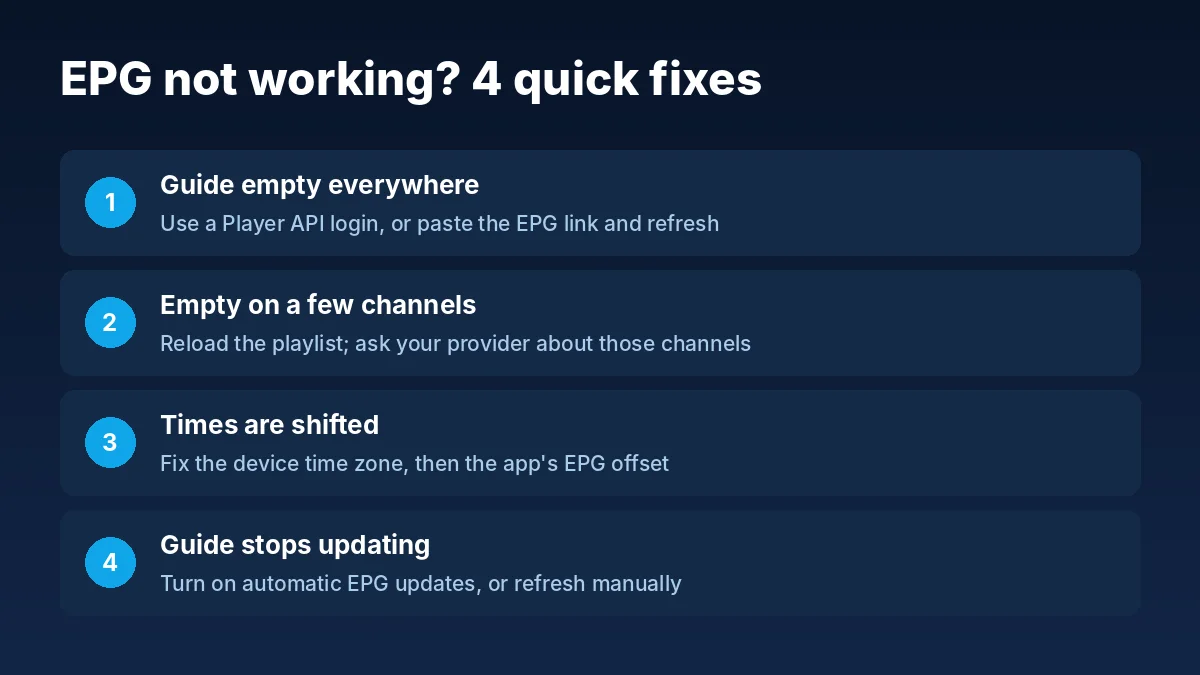
| What you see | Likely cause | Fix |
|---|---|---|
| “No information” on every channel | No EPG link added, or the guide has not downloaded yet | Use a Player API login, or paste the EPG link and refresh |
| Guide on some channels, empty on others | Channel IDs in the playlist do not match the guide | Ask your provider for an updated playlist; use type=m3u_plus links |
| Shows are an hour (or more) off | Time zone or EPG time offset setting | Set the correct time zone on the device, or adjust the EPG offset in the app |
| Guide stops after a day or two | EPG not refreshing | Turn on automatic updates, or refresh the EPG manually |
| App slow when opening the guide | Very large guide on a low-memory device | Limit the number of days, or hide channel groups you never watch |
Fixing wrong EPG times
Wrong times are the most common EPG complaint, and the fix is usually on your side, not the provider’s. First check that the date, time and time zone on your device are correct. If they are and the guide is still shifted by the same amount everywhere, use the EPG time offset (sometimes called EPG shift) in your app’s settings and move it by the number of hours you are off.
Fixing an empty guide on some channels
If most channels show a guide but a few do not, the guide file is working. Those few channels simply have no matching program data, or their ID changed. Providers update their lists regularly, so reloading the playlist often fixes it. If it does not, tell your provider which channels are missing.
The best EPG for IPTV: what a good guide source looks like
People often search for the “best EPG for IPTV” or the best EPG source for TiviMate. The honest answer: the best IPTV EPG is the one built for your playlist, because the channel IDs must match. A generic guide from another website often leaves half your channels empty. Judge any IPTV EPG source on these points:
| What to check | Good IPTV EPG | Weak IPTV EPG |
|---|---|---|
| Channel matching | IDs match your playlist (tvg-id) | Many channels show “No information” |
| Days ahead | 2 to 7 days, enough to plan the week | Only a few hours |
| Time zone | Correct for ET, CT, MT or PT, or easy to offset | Shifted by hours with no fix |
| Updates | Refreshed daily | Stops after a day or two |
| Size | Light enough for a Firestick | Huge file that slows the app |
In short, the best EPG for IPTV is accurate, light and updated every day. If your current IPTV EPG fails two of the checks above, ask your provider for a fresh guide link before changing apps.
For TiviMate users: the best EPG source for TiviMate is normally the XMLTV link from your own provider, added in Settings → EPG. With a Player API login many apps load the IPTV EPG automatically, so you never need a third-party guide. On a Fire TV Stick, keep the guide to a few days so it loads fast; see best IPTV for Firestick. If the picture freezes while you browse the guide, the cause is the stream, not the EPG: follow our IPTV buffering fix.
Does the EPG affect streaming quality?
No. The guide is only schedule information. It does not change picture quality or buffering. If channels freeze, the cause is the stream or your connection; our 20-minute speed test helps you find out which.
Want a service where the guide just works?
This guide is written by the team behind Marinios IPTV. Our service gives you 55,000 live channels and 250,000 movies and series, with the TV guide included. Log in with Player API and the EPG loads by itself; if your app needs a separate EPG link, we send it on WhatsApp.
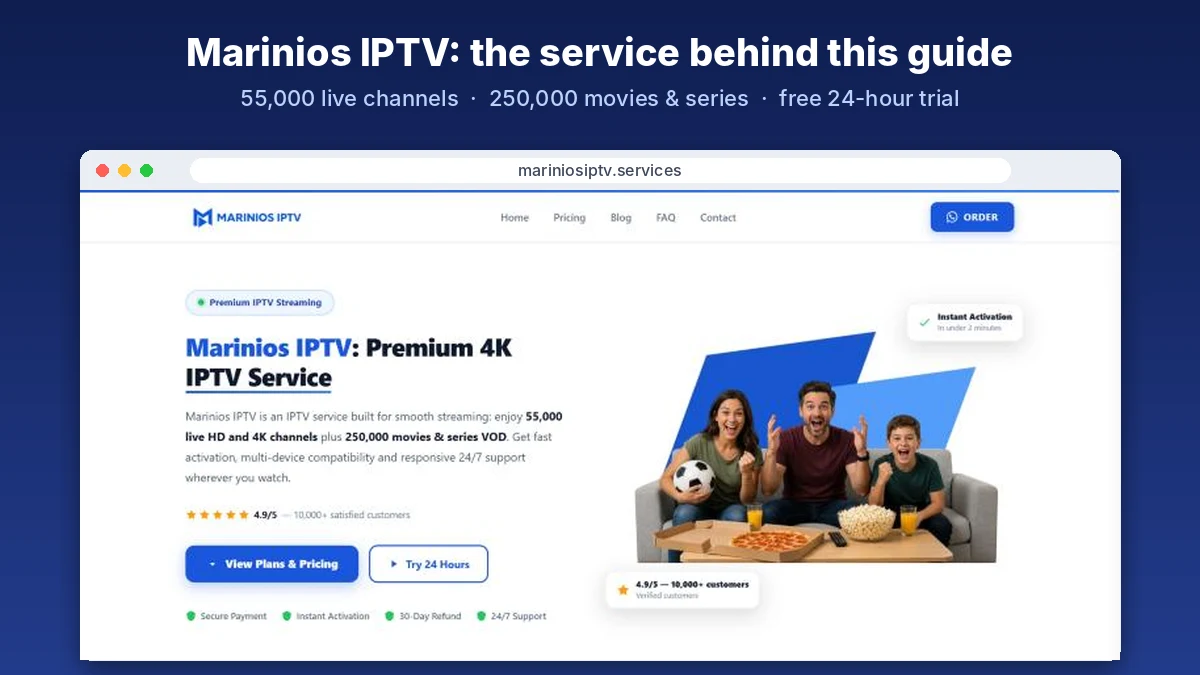
See the plans or start a free 24-hour trial on WhatsApp and check the guide on your own device before you pay.
On a Fire TV Stick, the guide loads with your Player API login; see best IPTV for Firestick. A working TV guide is also one of the 7 questions in our IPTV service providers checklist.
Quick questions
What is an EPG URL?
It is the web address of the TV guide data, usually an XMLTV link ending in .xml or .xml.gz. With a Player API login the guide loads by itself; with an M3U link you may need to paste this EPG URL into the player’s guide or EPG field.
Does the EPG button on my TV remote work with IPTV?
Usually not. That button opens the TV’s own guide. Your IPTV EPG is inside the player app, under TV Guide, EPG or Live with EPG.
What is the best EPG for IPTV?
The guide your own provider publishes for your playlist, because its channel IDs match. Third-party guides often leave channels empty.
Is the IPTV EPG free?
With most providers the IPTV EPG is included with your subscription. Marinios IPTV customers get it with their account at no extra cost.
Where do I add the EPG in TiviMate?
In Settings, then EPG, add your provider’s XMLTV link and choose how often it updates. With a Player API login it is usually added for you.
What does EPG mean on IPTV?
EPG means Electronic Program Guide: the TV schedule your IPTV app shows for each channel, now and in the coming days.
Is the EPG included with my IPTV subscription?
With most providers, yes. Marinios IPTV customers get the TV guide with their account; it loads automatically with a Player API login, and we can send the EPG link on WhatsApp for apps that need it.
Why is my IPTV guide empty?
Usually because the EPG link was not added, the guide has not finished downloading, or the channel IDs do not match. Start by refreshing the EPG in your app.
Why are the EPG times wrong?
Your device time zone or the app’s EPG offset is off. Fix the device time first, then adjust the offset if needed.
What is the difference between EPG and catch-up?
The EPG is the schedule. Catch-up lets you replay programs that already aired, on channels that support it, and it uses the EPG to know where each program starts.
Fire TV and Firestick are trademarks of Amazon.com, Inc. or its affiliates. IPTV Smarters, IBO Player Pro and TiviMate are trademarks of their respective owners. Marinios IPTV is not affiliated with or endorsed by them.