
You have a Samsung Smart TV and an IPTV subscription, and you want the two to work together without extra boxes or cables. Good news: on most Samsung TVs from the last few years you can do it with one app from the Samsung store and about ten minutes. This guide shows how to install IPTV on a Samsung Smart TV, which is the best IPTV app for Samsung TV for most homes, what to do after the free trial, and how to fix the problems people hit most. Everything here applies to IPTV on Samsung Smart TV models from recent years.
Quick answer: To get IPTV on a Samsung Smart TV, install an IPTV player from the Samsung Apps store, add your provider’s M3U link or Player API login, and wait for the channels to load. Most players need a one-time activation after a free period. Older TVs work best with a Firestick on HDMI.
Key takeaways
- Samsung TVs run Tizen, not Android, so you install IPTV apps from the Samsung Apps store, not Google Play.
- The easiest route for most people is a web-managed player such as IBO Player Pro: you add your playlist from your phone, not with the TV remote.
- Most players give a free trial, then ask for a one-time activation that is paid separately from your IPTV subscription.
- If your TV is old or the app is missing in your country, a Firestick or Android TV box plugged into the TV is the reliable backup.
In this guide
- Can you watch IPTV on Samsung Smart TV models?
- How to install IPTV on a Samsung Smart TV, step by step
- Best IPTV app for Samsung TV: which one to choose?
- IPTV Smarters on Samsung TV: what to expect
- After the free trial: activating the app
- IPTV on Samsung Smart TV not working? Quick fixes
- Using IPTV on Samsung Smart TV every day
- Tips for smoother IPTV on Samsung Smart TV
- Get a service that is ready for your Samsung TV
- Quick questions
Can you watch IPTV on Samsung Smart TV models?
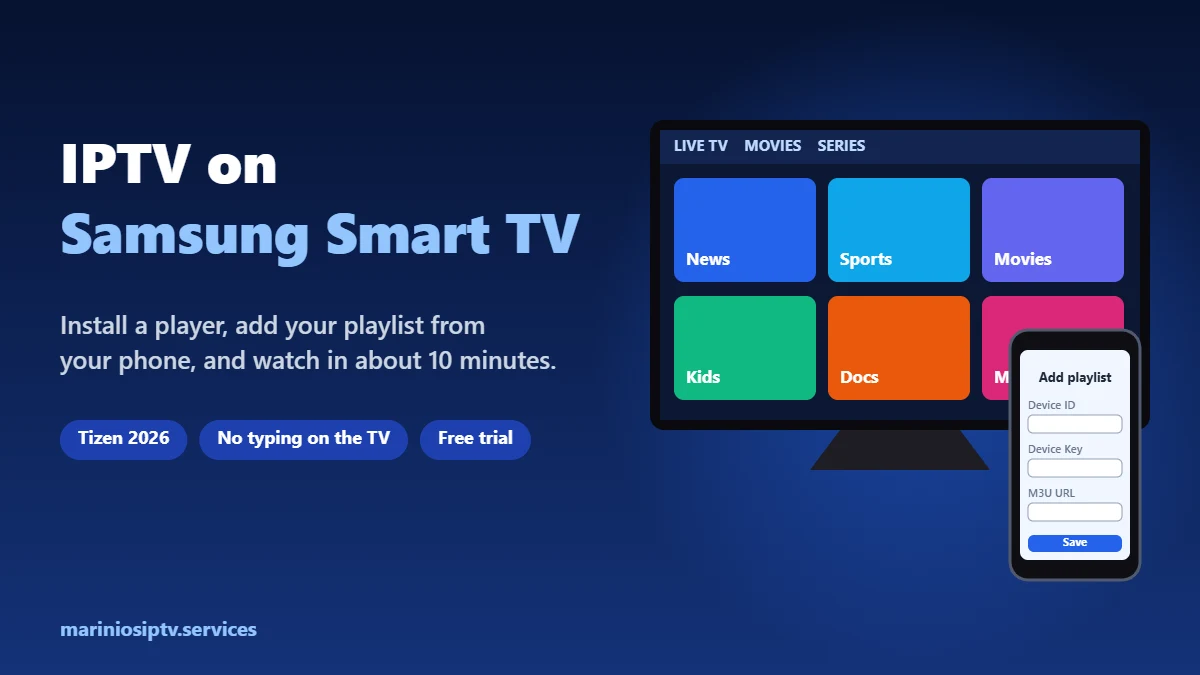
Yes. IPTV on Samsung Smart TV works through an app: Samsung does not include an IPTV player, but its app store offers several third-party players that can open the details your IPTV provider sends you. The TV becomes the screen and the remote; the player app reads your playlist; your subscription provides the channels.
Two things decide how smooth it will be:
- The model year. Recent Samsung TVs get the newest app versions. Older models may show fewer apps or none at all.
- Your country. The Samsung store is different from region to region, so an app you see in one guide may not appear on your TV.
Not sure which model you have? Open Settings → Support → About This TV. The model code and software version are listed there, and Samsung’s support site shows what each model supports.
How to install IPTV on a Samsung Smart TV, step by step

- Connect the TV to the internet. A cable is best. On Wi-Fi, keep the router close and use the 5 GHz network if you can.
- Open the Apps store. Press the Home button on the remote, go to Apps, then open the search icon.
- Search for the player. Type IBO Player (or the player you chose from the list below). Check the name and developer before you install: copycat apps exist.
- Install and open it. The first screen shows a Device ID (it looks like a MAC address) and a Device Key. Take a photo of it with your phone.
- Add your playlist from your phone. On your phone or computer, open the player’s official website, enter the Device ID and Device Key, and paste the M3U link your provider sent you. Add the EPG link too if you have one.
- Restart the app on the TV. Your channels, movies and series load. The first load can take a minute on a large playlist.
That is all it takes to install IPTV on Samsung Smart TV models with a web-managed player.
New to M3U links? Our M3U playlist guide explains every part of the link, and the EPG guide covers the TV guide.
Best IPTV app for Samsung TV: which one to choose?
| App type | How you log in | Good for | Watch out for |
|---|---|---|---|
| IBO Player Pro and similar web-managed players | Playlist added on the player’s website with your Device ID and Key | Most Samsung owners: no typing with the remote | Free trial, then a one-time activation per TV |
| Other web-managed players (Smart IPTV, SET IPTV style) | Same idea: upload your playlist online | Simple live TV viewing | Fewer movie and series features in some apps |
| A Firestick or Android TV box on HDMI | Player API login in IPTV Smarters Pro | Older TVs, or when no app appears in your store | One more device and remote |
The best IPTV app for Samsung TV can change as apps come and go in the store, so treat this as a starting point and check what your own store shows. Our IPTV player comparison goes deeper on IBO Player Pro versus IPTV Smarters Pro.
IPTV Smarters on Samsung TV: what to expect
“Can I get IPTV Smarters on my Samsung TV?” is one of the first things new customers ask us, usually because a friend uses it on a Firestick. The honest answer: it depends on your TV and your country. Apps in the Samsung store come and go, and what shows up on a 2024 TV in Texas is not always what shows up on a 2018 model.
Here is how we walk people through it on WhatsApp:
| What you find | What to do |
|---|---|
| IPTV Smarters appears in the Samsung Apps store | Check the developer name, install it, and log in with your Player API (Xtream) details or your M3U link |
| It does not appear on your TV | Use a web-managed player from the table above. Same login, same channels, different look |
| You really want the Smarters layout | Plug a Firestick into the TV’s HDMI port and run IPTV Smarters Pro there. See our Firestick install guide |
| Your TV is older and the store is almost empty | The stick is the simplest way. It also tends to feel faster than the TV’s own processor |
To know your model year, open Settings → Support → About This TV. The model code tells you a lot about which apps your store will offer. And whatever app you end up with, the subscription is the same: the app is the remote control, the service is the channels. If your link looks confusing, our M3U playlist guide explains every part of it.
After the free trial: activating the app
Most players for IPTV on Samsung Smart TV work for a trial period, then show an activation screen with your Device ID and Device Key. That activation is a one-time payment for the app on that TV, and it is separate from your IPTV subscription: the subscription gives you the channels, the activation unlocks the player.
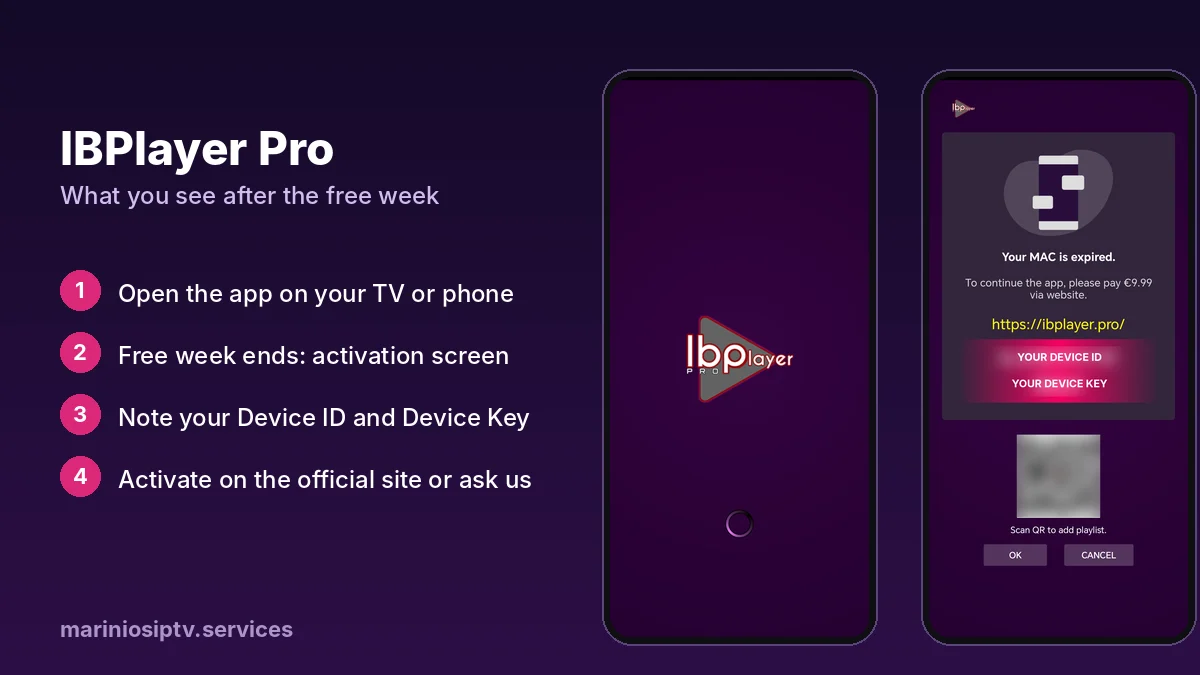
You can activate it yourself on the player’s official website, or send us a photo of the activation screen on WhatsApp and we activate it for you, together with your subscription, in the same chat.
IPTV on Samsung Smart TV not working? Quick fixes
| What you see | Likely cause | Fix |
|---|---|---|
| The app does not appear in the store | Older model or not offered in your country | Try another player, or use a Firestick or Android TV box |
| “No playlist” after adding it online | Wrong Device ID, or the app was not restarted | Check the ID and Key letter by letter, then close and reopen the app |
| Channels load but will not play | Stream format or a typo in the link | Copy the link again in one piece; try output=m3u8 instead of ts |
| Buffering at evening peak | Wi-Fi signal or internet speed | Use a cable, move the router, and test with our 20-minute speed test |
| TV guide empty or times wrong | EPG link missing or time zone off | Add the EPG link and check the TV’s time zone; see the EPG guide |
| App stopped after a few days | Player trial ended | Activate the app (see above); your subscription is not affected |
Using IPTV on Samsung Smart TV every day
Once your channels load, a few habits make IPTV on Samsung Smart TV feel as easy as cable.
Build a favorites list
Most players let you add a channel to Favorites from the channel list, often with a long press on OK. Put the ten channels you watch most there and you skip scrolling through thousands of entries.
Hide the groups you never watch
Large playlists have hundreds of categories. Hiding the countries and groups you do not need makes the app faster and the list cleaner, especially when you run IPTV on Samsung Smart TV models that are a few years old.
Lock adult categories
If children use the TV, set a parental PIN in the player’s settings and lock the groups you want to keep private. It takes a minute and protects every profile on the TV.
Use the same account on more screens
Your subscription can run on your Samsung TV, phone and tablet, within the number of screens your plan allows. Each device needs its own player app, and Samsung players usually need their own activation after the trial.
Use catch-up with the TV guide
When your provider supports catch-up on a channel, you can replay programs straight from the guide. Make sure the EPG is loaded first: without it, catch-up has nothing to point to.
Tips for smoother IPTV on Samsung Smart TV
Small changes make a big difference to picture quality when you watch IPTV on Samsung Smart TV models:
- Use a wired connection when the TV is far from the router. It is the single biggest fix for buffering.
- Keep the TV software updated: Settings → Support → Software Update.
- Turn off motion smoothing for sports if the picture looks unnatural; it is in the picture settings, often under Picture Clarity.
- Restart the TV fully once in a while: hold the power button on the remote until the logo appears.
Get a service that is ready for your Samsung TV
This guide is written by the team behind Marinios IPTV: 55,000 live channels and 250,000 movies and series, with M3U and Player API details for any player. We help you set up IPTV on Samsung Smart TV on WhatsApp, and we can activate your player in the same chat.
See the plans or start a free 24-hour trial on WhatsApp and test it on your own TV before you pay.
The TV app only shows channels; they come from your subscription. See how IPTV service providers work and compare plans in our IPTV subscription guide.
Still buffering? Our IPTV buffering fix finds the cause in 2 minutes and walks you through 6 fixes, from Wi-Fi to the provider.
Getting “Authorization failed” after you type your login? Our IPTV Smarters failed to authorize fix walks through the seven usual causes.
If your TV runs Roku instead of Samsung software, follow our IPTV on Roku guide.
Have an LG TV instead? Our IPTV on LG Smart TV guide covers the LG Content Store players and the Device ID setup.
Quick questions
Is IPTV Smarters available on Samsung TV?
On some models and in some countries, yes. If it does not show in your Samsung Apps store, use another player with the same login, or run IPTV Smarters on a Firestick plugged into the TV.
Can I use the same subscription on my Samsung TV and my Apple TV?
Yes, up to the screens in your plan. See our IPTV on Apple TV guide for the Apple side.
Can I download IPTV Smarters Pro on a Samsung TV?
It depends on your model and country, and the Samsung version has come and gone over the years. If you want Smarters specifically, the dependable way is a Firestick or Android TV box plugged into the TV. Our Firestick guide shows every step.
What is the best IPTV app for Samsung TV?
For most people, a web-managed player such as IBO Player Pro is the best IPTV app for Samsung TV, because you add your playlist from your phone. If your store does not list it, try another player from the store or use a Firestick.
Is there a free IPTV app for Samsung TV?
Most players offer a free trial. After that, they usually ask for a one-time activation. The channels themselves come from your IPTV subscription, not from the app.
Do I need a box to watch IPTV on a Samsung TV?
Not on most recent models: an app from the Samsung store is enough. A box helps on older TVs or when the app you want is missing.
Can I use the same subscription on my Samsung TV and my phone?
Yes, as long as your plan allows that many screens at the same time. Each device needs its own player app.
Why does my Samsung TV say the playlist is expired?
Either your IPTV subscription ended or the player’s trial ended. Check which one: the player shows an activation screen, while an expired subscription usually shows a login or authorization error.
Samsung, Smart TV and Tizen are trademarks of Samsung Electronics. IPTV Smarters, IBO Player Pro, Fire TV and Apple TV are trademarks of their respective owners. Marinios IPTV is not affiliated with or endorsed by them.